CompTIA A+ 220-801 and 220-802 LiveLessons (Video Training)
- By Elizabeth H. Smith, Robin Graham
- Published Sep 7, 2012 by Pearson IT Certification. Part of the LiveLessons series.
Downloadable Video
- Sorry, this book is no longer in print.
- About this video
Accessible from your Account page after purchase. Requires the free QuickTime Player software.
Videos can be viewed on: Windows 8, Windows XP, Vista, 7, and all versions of Macintosh OS X including the iPad, and other platforms that support the industry standard h.264 video codec.
Register your product to gain access to bonus material or receive a coupon.
Description
- Copyright 2013
- Edition: 1st
- Downloadable Video
- ISBN-10: 0-7897-4988-2
- ISBN-13: 978-0-7897-4988-8
Intended Audience - For anyone who is studying for the newly refreshed CompTIA A+ exam. In recent years, approximately 70,000 people have taken the exam per year.
Course Requirements - In order to receive CompTIA A+ certification a candidate must pass two exams. The first exam is CompTIA A+ 220-801 Certification Exam. The CompTIA A+ 220-802 Certification Exam is the second exam required in order for CompTIA A+ certification candidates to complete their certification.
13+ Hours of Video Instruction
The brand-new CompTIA A+220-801 and 220-802 LiveLessons is the ultimate video training package for today’s A+ candidate! Authors and instructors Beth Smith and Robin Graham offers more than 13 hours of expert, step-by-step video walkthroughs covering exam objectives for the CompTIA A+ 220-801 and 220-802 exams.
Limited Time Offer: Buy CompTIA A+220-801 and 220-802 LiveLessons and receive a 10% off discount code for theCompTIA A+220-801 and 220-802 exams. To receive your 10% off discount code login to your pearsonITcertification.com Account page, locate the product and click on “Access Bonus Content”.
CompTIA A+220-801 and 220-802 LiveLessons is a perfect companion to classroom or book self-study preparation helping you to understand the concepts and better prepare for the newly introduced performance-based exam questions.
These LiveLessons cover CompTIA A+ topics such as firmware, hardware, Windows 7, Windows XP, Windows Vista, printers, laptops, networking, security, and operational procedures in focused and concise videos so you can find specific topics and master them quickly.
Part 1: Hardware, Section 1: Firmware
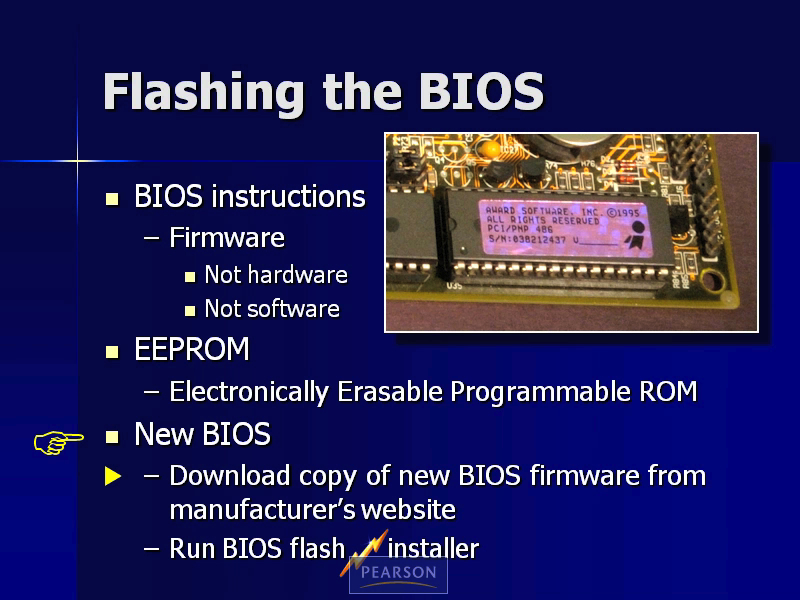
This lesson covers Firmware BIOS and CMOS.
Part 1: Hardware, Section 2: Hardware
This lesson includes coverage of A+ hardware topics such as Motherboards, Memory, power supplies, ports and connectors, and storage devices.
Part 2: Windows XP, Section 1: Before Installation
This lesson discusses how to prepare the PC to accept the operating system.
Part 2: Windows XP, Section 2: The Installation
This lesson discusses in detail how to install an operating system.
Part 2: Windows XP, Section 3: Using the Desktop
This section covers using the desktop including Windows Explorer, the Start Menu, and the Taskbar.
Part 2: Windows XP, Section 4: Control Panel
This lesson covers the Control Panel and using Admin tools.
Part 2: Windows XP, Section 5: Accessories
This lesson covers Accessories and system tools.
Part 2: Windows XP, Section 6: Drive Properties
This lesson covers Drive Properties such as backup, Chksk, defragment, and disk cleanup.
Part 2: Windows XP, Section 7: Installation CD
This lesson covers the Installation CD Recovery Console and In-Place Recovery.
Part 2: Windows XP, Section 8: Additional Windows XP Topics
This lesson covers a variety of Windows XP topics such as Task Manager, The Registry, Shortcuts, and the Advanced Options Menu.
Part 3: Windows Vista
This lesson gives you a solid background Windows Vista for the A+ exam.
Part 4: Windows 7, Section 1: Introduction
This lesson is an introduction to Windows 7 and the Start Menu.
Part 4: Windows 7, Section 2: Control Panel-System and Security
This lesson covers the Control Panel, Systems Security and the Admin Tools.
Part 4: Windows 7, Section 3: Control Panel-Hardware and Sound
This lesson covers hardware and sound including autoplay, power options and the Windows Mobility Center.
Part 4: Windows 7, Section 4: Control Panel-Programs
This lesson is an introduction to programs.
Part 4: Windows 7, Section 5: Control Panel-User Accounts and Family Safety
This lesson covers user accounts and family safety including Parental Controls and Credential Manager.
Part 4: Windows 7, Section 6: Control Panel-Appearance and Personalization
This lesson covers Appearance and Personalization including Desktop Gadgets, Display, and Folder Options.
Part 4: Windows 7, Section 7: Control Panel-Clock, Language, and Region
This lesson covers the Clock, Language, and Region settings in the Control Panel.
Part 4: Windows 7, Section 8: Control Panel-Ease of Access
This lesson covers the Ease of Access Center.
Part 4: Windows 7, Section 9: Accessories-Introduction
This lesson is an introduction to accessories such as the Remote Desktop Connection, Sync Center and Offline Files.
Part 4: Windows 7, Section 10: Accessories-System Tools
This lesson covers the Accessories System Tools including Computer and Drive Mapping, System Information and Windows Easy Transfer.
Part 5: Printers
This lesson covers printer hardware and how to configure printers in Windows XP as well as configuring devices and printers in Windows 7.
Part 6: Laptops
This lesson covers laptop hardware, memory, displays, input devices and power management.
Part 7: Networking, Section 1: Topologies and Physical Connections
This lesson covers the topologies and physical connections of your network.
Part 7: Networking, Section 2: Protocols and Configuration Settings
This lesson covers the protocols and configuration settings on the local network.
Part 7: Networking, Section 3: Communication Outside the Local Network
This lesson covers communication outside the local network.
Part 8: Security
Network security is discussed in this lesson. Topics include physical security and authentication, firewalls, wireless security, and malware.
Part 9: Operational Procedures
This lesson covers environmental issues along with customer service issues.
LiveLessons Video Training series publishes hundreds of hands-on, expert-led video tutorials covering a wide selection of technology topics designed to teach you the skills you need to succeed. This professional and personal technology video series features world-leading author instructors published by your trusted technology brands: Addison-Wesley, Cisco Press, IBM Press, Pearson IT Certification, Prentice Hall, Sams, and Que. Topics include: IT Certification, Programming, Web Development, Mobile Development, Home & Office Technologies, Business & Management, and more. View All LiveLessons.
Sample Content
Table of Contents
Part 1: Hardware, Section 1: Firmware
Firmware: BIOS 6:19
Firmware: CMOS 3:48
Part 1: Hardware, Section 2: Hardware
Hardware: Motherboards 6:06
Hardware: Memory 7:17
Hardware: Storage Devices 14:56
Hardware: CPUs 8:19
Hardware: Ports and Connectors 7:40
Hardware: Power Supplies 3:59
Hardware: Display 6:36
Hardware: Physical Cleaning Methods 3:31
Part 2: Windows XP, Section 1: Before Installation
Before Installation: Partitioning the Hard Drive 3:13
Before Installation: Active, System, and Boot Partitions 2:42
Before Installation: Formatting the Hard Drive 3:02
Before Installation: File Allocation Table 2:39
Before Installation: Operating Modes 3:38
Part 2: Windows XP, Section 2: The Installation
The Installation: Installation Types 4:52
The Installation: System Files 5:37
The Installation: File Systems 4:16
The Installation: Installation Methods 2:10
Part 2: Windows XP, Section 3: Using the Desktop
Using the Desktop: Windows Explorer 2:07
Using the Desktop: Start Menu 5:08
Using the Desktop: Taskbar 1:18
Using the Desktop: Date and Time 1:10
Using the Desktop: Display 4:02
Part 2: Windows XP, Section 4: Control Panel
Control Panel: Control Panel 3:04
Control Panel: Accessibility 5:50
Control Panel: Add or Remove Programs 3:25
Control Panel: Admin Tools: The System Monitor 6:00
Control Panel: Admin Tools: Services 2:33
Control Panel: Admin Tools: Event Viewer 5:57
Control Panel: Admin Tools: Disk Management 3:36
Control Panel: Admin Tools: Local Users and Groups 9:10
Control Panel: Folder Options 5:39
Control Panel: The Mouse 2:49
Control Panel: Regional and Language Options 1:38
Control Panel: System: System Properties General Tab 2:36
Control Panel: System: Computer Name 2:28
Control Panel: System: Device Manager 7:25
Control Panel: System: Driver Signing 5:09
Control Panel: System: Hardware Profiles 5:18
Control Panel: System: Virtual Memory 3:44
Control Panel: System: Startup and Recovery 3:28
Control Panel: System: Error Reporting 1:46
Control Panel: System: System Properties Advanced Tab 3:50
Control Panel: System: Remote Assistance 5:36
Control Panel: System: Remote Desktop 5:14
Control Panel: User Accounts 8:18
Part 2: Windows XP, Section 5: Accessories
Accessories: Windows Updates and Automatic Updates 3:44
Accessories: Compatibility Mode 2:13
Accessories: System Tools: USMT/Files and Settings Transfer Wizard 2:11
Accessories: System Tools: Scheduled Tasks 2:22
Accessories: System Tools: System Information 3:58
Accessories: System Tools: DirectX Diagnostic Tool 2:32
Accessories: System Tools: System Restore 4:24
Accessories: Command Line 8:33
Part 2: Windows XP, Section 6: Drive Properties
Drive Properties: Backup 12:45
Drive Properties: ASR 1:55
Drive Properties: Chkdsk 12:45
Drive Properties: Defragment 3:51
Drive Properties: Disk Cleanup 4:05
Drive Properties: Disk Quotas 2:50
Part 2: Windows XP, Section 7: Installation CD
Installation CD: The Recovery Console 4:02
Installation CD: In-Place Upgrade 1:33
Part 2: Windows XP, Section 8: Additional Windows XP Topics
Additional Windows XP Topics: Folder Properties 10:34
Additional Windows XP Topics: Task Manager 5:00
Additional Windows XP Topics: Msconfig 3:48
Additional Windows XP Topics: The Registry 8:35
Additional Windows XP Topics: Microsoft Management Console 7:04
Additional Windows XP Topics: Map a Network Drive 4:26
Additional Windows XP Topics: Shortcuts 2:05
Additional Windows XP Topics: Advanced Options Menu 4:25
Additional Windows XP Topics: Windows File Protection and System File Checker 4:22
Additional Windows XP Topics: Keyboard Navigation 5:27
Part 3: Windows Vista
Start Menu 5:21
What’s New 9:30
What’s Different 19:14
What’s the Same 9:19
What Else Do You Need to Know 6:49
Windows Vista Summary 2:17
Part 4: Windows 7, Section 1: Introduction
Introduction to Windows 7 1:45
Start Menu 2:29
Part 4: Windows 7, Section 2: Control Panel-System and Security
Control Panel: Introduction to Control Panel 0:57
Control Panel: Introduction to System and Security 0:51
Control Panel: System and Security: Action Center 8:33
Control Panel: System and Security: System 11:47
Control Panel: System and Security: Windows Update 1:42
Control Panel: System and Security: Backup and Restore 2:57
Control Panel: System and Security: Windows Anytime Upgrade 2:15
Control Panel: System and Security: Introduction to Administrative Tools 1:30
Control Panel: System and Security: Admin Tools: Computer Management: Shared Folders 0:56
Control Panel: System and Security: Admin Tools: Computer Management: Local Users and Groups 4:43
Control Panel: System and Security: Admin Tools: Computer Management: Disk Management 4:02
Control Panel: System and Security: Admin Tools: Event Viewer 2:58
Control Panel: System and Security: Admin Tools: Performance 2:53
Control Panel: System and Security: Admin Tools: Services 1:45
Control Panel: System and Security: Admin Tools: System Configuration 4:18
Control Panel: System and Security: Admin Tools: Task Scheduler 1:47
Part 4: Windows 7, Section 3: Control Panel-Hardware and Sound
Control Panel: Introduction to Network and Internet 0:37
Control Panel: Introduction to Hardware and Sound 0:57
Control Panel: Hardware and Sound: AutoPlay 1:27
Control Panel: Hardware and Sound: Sound 2:35
Control Panel: Hardware and Sound: Power Options 2:35
Control Panel: Hardware and Sound: Windows Mobility Center 1:12
Part 4: Windows 7, Section 4: Control Panel-Programs
Control Panel: Introduction to Programs 0:39
Control Panel: Programs: Programs and Features 2:15
Control Panel: Programs: Default Programs 4:12
Part 4: Windows 7, Section 5: Control Panel-User Accounts and Family Safety
Control Panel: Introduction to User Accounts and Family Safety 0:52
Control Panel: User Accounts and Family Safety: User Accounts 6:43
Control Panel: User Accounts and Family Safety: Parental Controls 2:35
Control Panel: User Accounts and Family Safety: Credential Manager 1:24
Control Panel: User Accounts and Family Safety: Mail 0:58
Part 4: Windows 7, Section 6: Control Panel-Appearance and Personalization
Control Panel: Introduction to Appearance and Personalization 0:58
Control Panel: Appearance and Personalization: Personalization 2:45
Control Panel: Appearance and Personalization: Display 3:19
Control Panel: Appearance and Personalization: Desktop Gadgets 1:12
Control Panel: Appearance and Personalization: Taskbar and Start Menu 4:30
Control Panel: Appearance and Personalization: Folder Options 3:23
Part 4: Windows 7, Section 7: Control Panel-Clock, Language, and Region
Control Panel: Introduction to Clock, Language, and Region 0:28
Control Panel: Clock, Language, and Region: Date and Time 2:28
Control Panel: Clock, Language, and Region: Region and Language 1:57
Part 4: Windows 7, Section 8: Control Panel-Ease of Access
Control Panel: Introduction to Ease of Access 1:09
Control Panel: Ease of Access Center 2:46
Part 4: Windows 7, Section 9: Accessories-Introduction
Accessories: Introduction to Accessories 0:55
Accessories: Getting Started 2:32
Accessories: Remote Desktop Connection 3:27
Accessories: Sync Center and Offline Files 2:26
Accessories: Windows Explorer and Libraries 4:09
Part 4: Windows 7, Section 10: Accessories-System Tools
Accessories: Introduction to System Tools 1:00
Accessories: System Tools: Computer and Drive Mapping 3:15
Accessories: System Tools: Internet Explorer (No Add-ons) 1:42
Accessories: System Tools: System Information 2:59
Accessories: System Tools: Windows Easy Transfer 3:42
Task Manager 4:10
Part 5: Printers
Printer Hardware — 9:48
Configuring Printers in Windows XP — 4:10
Configuring Devices and Printers in Windows 7 - 7:50
Part 6: Laptops
Ports, Connectors, and Components 10:08
Memory 2:19
Displays 3:18
Power Management in Windows XP 6:29
Power Management in Windows 7 2:35
Input Devices 1:54
Recovery Methods 2:02
Part 7: Networking, Section 1: Topologies and Physical Connections
Topologies and Physical Connections: Comparing LANs and WANs 3:29
Topologies and Physical Connections: Network Topologies 3:34
Topologies and Physical Connections: Transmission Media: Copper Cables 4:50
Topologies and Physical Connections: Transmission Media: Fiber Optic Cables 2:25
Topologies and Physical Connections: Transmission Media: Wireless 3:10
Topologies and Physical Connections: NICs, Routers, Switches, and Hubs 5:58
Part 7: Networking, Section 2: Protocols and Configuration Settings
Protocols and Configuration Settings on the Local Network: Network Protocols 8:23
Protocols and Configuration Settings on the Local Network: Network Configuration in Windows XP 8:37
Protocols and Configuration Settings on the Local Network: Network and Sharing Center in Windows 7 10:27
Protocols and Configuration Settings on the Local Network: Home Group in Windows 7 6:41
Protocols and Configuration Settings on the Local Network: IPv4 Addresses 4:53
Protocols and Configuration Settings on the Local Network: Public and Private IP Addresses 3:13
Protocols and Configuration Settings on the Local Network: IPv6 Addresses 3:15
Protocols and Configuration Settings on the Local Network: Ports 2:14
Protocols and Configuration Settings on the Local Network: Troubleshooting 6:29
Part 7: Networking, Section 3: Communication Outside the Local Network
Communication Outside the Local Network: Routers 4:02
Communication Outside the Local Network: WAN Technologies 3 :00
Communication Outside the Local Network: Internet Options in Windows XP 6:41
Communication Outside the Local Network: Internet Options in Windows 7 4:20
Communication Outside the Local Network: SSL 1:51
Communication Outside the Local Network: Email 2:30
Communication Outside the Local Network: FTP and Telnet 1:40
Part 8: Security
Physical Security and Authentication 9:12
Local Security Policy in Windows XP 8:09
Local Security Policy in Windows 7 5:13
EFS (Encrypted File System) in Windows XP 3:13
TPM and BitLocker Drive Encryption in Windows 7 3:13
File Sharing and Permissions 8:27
Firewall in Windows XP 3:27
Firewall in Windows 7 2:43
Wireless Security 6:02
Malware 8:32
Part 9: Operational Procedures
Environmental and Safety Issues 11:14
Customer Service 12:55
More Information
Other Things You Might Like
- Premium Edition eBook $55.99
